Reference Tools and Software
This page extracts the named software, products, and platforms from the Pivot research reports. It is a reference map, not a vendor shortlist or purchasing recommendation.
Use it for three jobs:
- benchmark what competitors already claim
- recognize stack names during customer discovery
- avoid confusing the first Release Readiness wedge with a broad PLM, ERP, CAD, or CAE replacement
Main Takeaway
The reports point to a crowded tool landscape, but not a fully solved workflow. Most tools own one layer:
- CAD-to-ERP/BOM transfer
- drawing feature extraction
- PLM/BOM management
- engineering search/RAG
- CAD-native copilots
- CAE workflow automation
The open space for RapidDraft is still the junction between drawing intelligence, BOM/revision consistency, release readiness, and human-approved handoff into downstream systems.
Primary Market References
| Tool / software | Report category | What the reports say | RapidDraft implication |
|---|---|---|---|
| CADTALK | CAD-to-ERP / BOM transformation | Transforms CAD/PDM/PLM eBOMs into ERP-ready mBOMs, routings, items, inventory records, and structures. Reports treat it as the clearest signal that buyers pay for engineering-to-manufacturing handoff. | Benchmark the writeback and ROI story. RapidDraft should add drawing/package intelligence before the handoff, not copy a connector business first. |
| CADDi / CADDi Drawer | Manufacturing AI data platform; drawing intelligence | Uses drawing analysis, OCR, title-block digitization, similar-drawing search, shape/feature digitization, and cross-functional manufacturing data search. | Strong evidence that drawing-centric manufacturing intelligence has enterprise demand. RapidDraft can stay narrower around release readiness. |
| Werk24 | Technical drawing feature extraction API | Extracts title blocks, measures, tolerances, threads, GD&T, radii, surface roughness, and related drawing features into structured outputs such as JSON. | Possible benchmark or partner pattern for drawing extraction. Its gap is that extraction alone does not own BOM, ECO, or ERP action. |
| CoLab / AutoReview | AI design review and engineering decision workflow | Provides AI Drawing Review, AI CAD Review, AI Knowledge Graph, and AI Lessons Learned around 2D drawings, 3D models, DFM issues, and review governance. | Serious benchmark for review UX and enterprise trust. RapidDraft should avoid becoming only a review workspace. |
| OpenBOM / Product Knowledge Graph | Cloud BOM/PDM/PLM and product graph | Manages BOMs, parts, revisions, change, CAD files, inventory, purchases, CAD integrations, ERP integrations, and product knowledge graph concepts. | Benchmark for transparent packaging and lightweight BOM/PLM. RapidDraft should integrate around BOM systems rather than replace them first. |
| Duro / Duro Design | AI-native PLM/PDM | Positions as API-first PLM for hardware teams with CAD release management, BOM unification, change orders, revision control, cost and lead-time rollups, and ERP/MES connections. | Shows broad PLM can absorb some AI workflow claims. RapidDraft should stay workflow-specific. |
| Siemens Teamcenter AI / Teamcenter Copilot | PLM-native engineering RAG | Provides semantic search, cited document chat, OCR on scans, permission-aware knowledge bases, and indexing of NX/Solid Edge drawings plus Teamcenter requirements artifacts. | Do not sell generic engineering document chat. Focus on cross-system release actions where PLM-native RAG is weaker. |
| PTC Windchill AI Parts Rationalization | Part reuse and duplicate detection | Identifies similar or duplicate parts in Windchill and supports rationalization of part libraries and EBOMs. | Validates part reuse value, but the report treats it as incumbent-bound and not the first RapidDraft wedge. |
| Leo AI | CAD-native mechanical engineering copilot | Uses a Large Mechanical Model narrative for design generation, inspection, technical Q&A, parts discovery, and CAD editor integration. | Good UX and category benchmark for CAD-native assistants. Less direct than release package readiness and ERP/BOM handoff. |
| MecAgent | SolidWorks AI copilot / CAD automation | Automates repetitive SolidWorks tasks and macro-style workflows for mechanical engineers. | Useful reminder that CAD automation has demand, but it does not own manufacturing release data. |
| VizSeek | Visual search and engineering RAG | Searches CAD files, drawings, images, documents, and repositories across PLM, ERP, PDM, DAM, and SharePoint; includes RAG-style retrieval. | Strong search/part reuse reference. RapidDraft should push retrieval into release decisions and structured actions. |
| QualityEngineer.ai / Blueprint Intelligence | AI drawing feature extraction | Extracts dimensions, tolerances, GD&T callouts, critical characteristics, material specs, and drawing notes for quality and inspection workflows. | Validates quality-focused drawing extraction. ERP/BOM/ECO integration remains the likely gap. |
| Markovate AI Blueprint Classifier | Drawing-to-BOM extraction | Markets technical drawing analysis, annotation, dimension extraction, and CAD-to-BOM conversion. | Confirms the drawing-to-BOM message exists, but the reports flag limited public evidence on deep integrations and traction. |
| CCTech AI Part Search | Part intelligence and reuse | Integrates CAD, PLM, ERP, and document information for part search, duplicate elimination, and reuse. | Validates multi-system part intelligence, but appears more consulting/project-heavy than a narrow SaaS workflow. |
| Propel / Propel One | AI product thread / PLM-QMS-PIM | Frames AI around an intelligent product thread, role-based agents, and cross-functional product data across engineering, quality, and commercial work. | Important market framing, but broader than the first Release Readiness wedge. |
| Makersite | Product lifecycle intelligence | Connects BOM/product files from CAD, ERP, and PLM with material, substance, cost, compliance, and supply-chain data. | Shows value in semantic product data tied to cost and compliance, but it is not the immediate release workflow. |
| Paperless Parts | RFQ and manufacturing preparation | Mentioned as adjacent to quote/manufacturing prep rather than direct design review. | Watch as a supplier/RFQ-adjacent reference, not as the core benchmark. |
UI And Workflow Media
This is a small media board for quickly studying product UI, workflow shape, and demo language. Static images come first so the page can be scanned quickly; videos sit below for deeper workflow review. The images and videos are linked from public product pages, public product media, official videos, or clearly labeled marketplace/reference pages; they are not copied into this wiki.
Interface Image Board
| Product | Static image / product page | What to inspect |
|---|---|---|
| CADDi Drawer | .webp) CADDi site |
Search-first drawing library, similar-drawing results, purchase/order context, and how drawing thumbnails stay visible while structured data appears below. |
| CoLab AutoReview drawing UI | 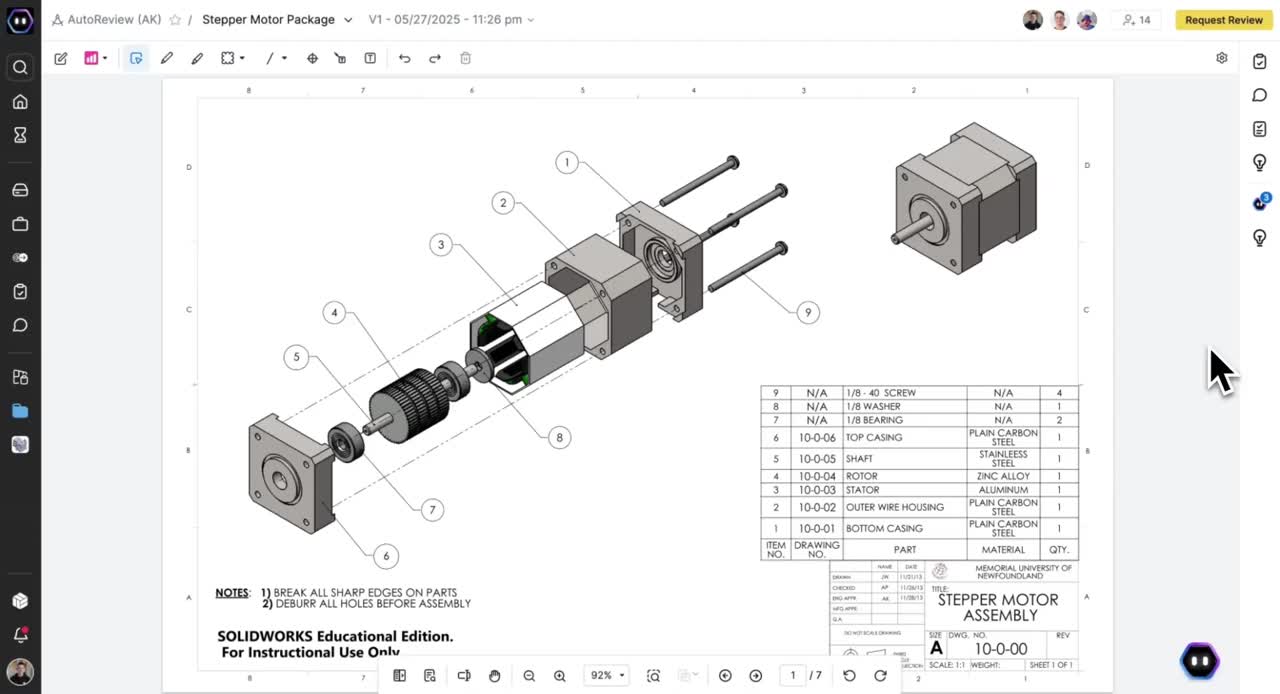 AutoReview product page |
Drawing viewer density, side navigation, review request placement, markup tools, and whether AI findings feel like comments, checklist items, or evidence. |
| CoLab AutoReview CAD UI | 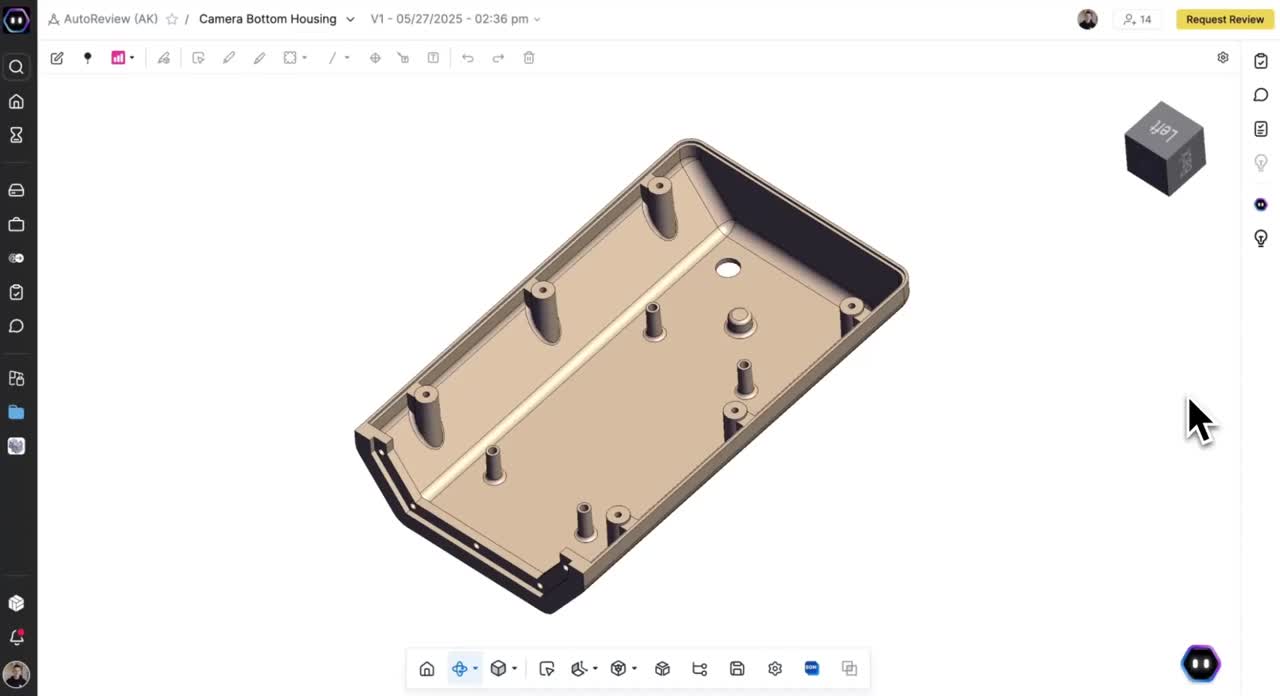 AutoReview product page |
3D model review surface, toolbar simplicity, issue assistant placement, and how 3D inspection differs from 2D drawing review. |
| OpenBOM CAD integration | 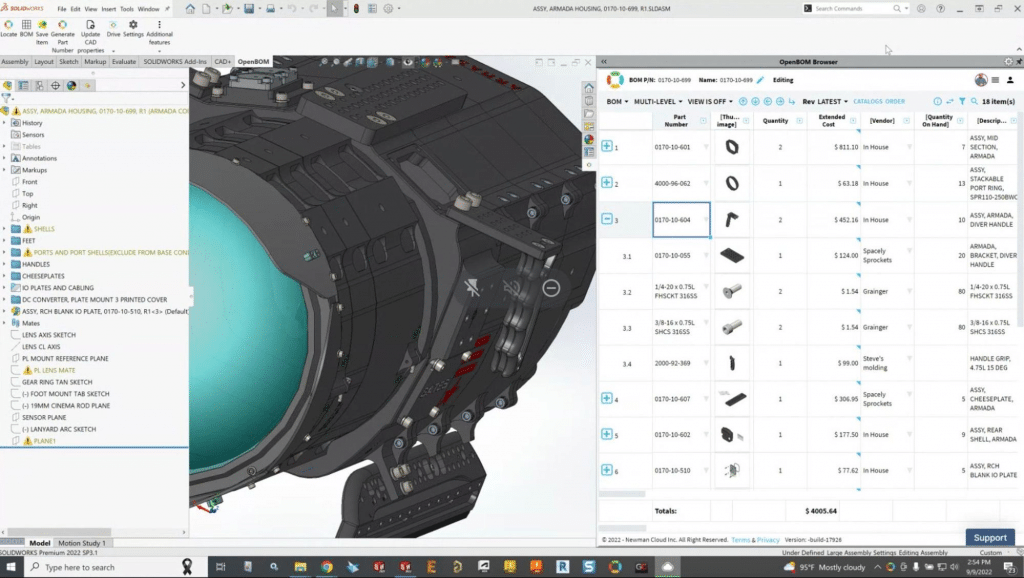 CAD integration article |
CAD-side BOM panel, part thumbnails, columns, cost/vendor data, and the split-screen pattern between CAD geometry and BOM system. |
| OpenBOM Onshape integration | 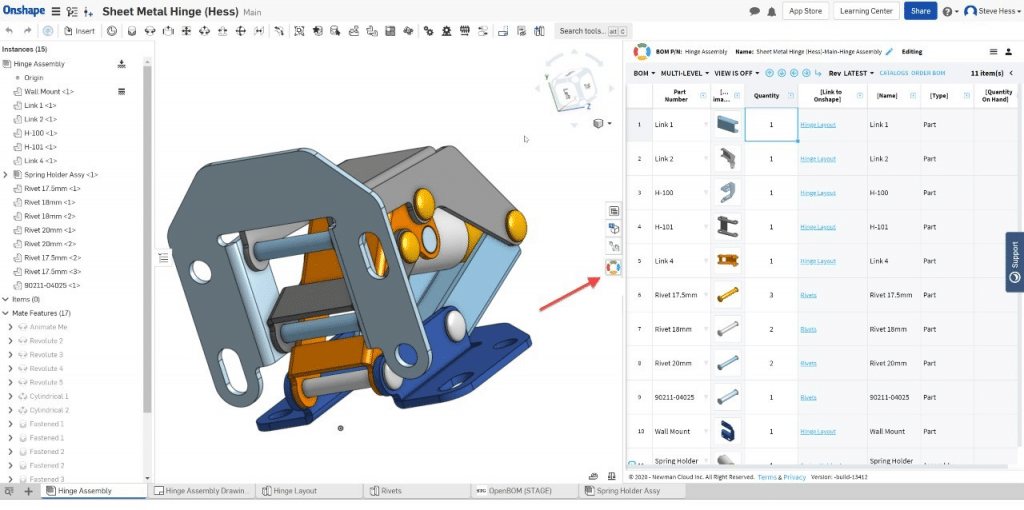 CAD integration article |
Browser-embedded workflow, cloud CAD context, and how a lightweight BOM table can live alongside the source assembly. |
| Leo AI CAD copilot |  Onshape guidance post |
Split-screen CAD plus chat assistant pattern, prompt examples, suggested task cards, and how the assistant stays beside the engineering workspace. |
| Markovate Blueprint Classifier |  AI Blueprint Classifier |
Highlighted drawing callouts, extracted specification panel, edit/download actions, and whether the UI makes the extraction auditable. |
| Markovate similar drawing search |  AI Blueprint Classifier |
Drawing-search result layout, magnified evidence, and how extracted material or feature terms become retrieval queries. |
| VizSeek visual search |  VizSeek site |
Visual-search framing, how the product explains shape/image/sketch search, and whether the UI emphasizes retrieval more than downstream action. |
| CCTech AI Part Search | 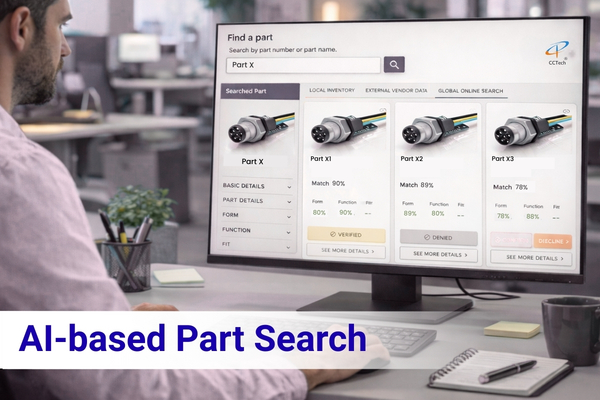 AI-based Part Search |
Part-card comparison layout, match confidence, approval/rejection actions, and how reuse is framed for engineering decision support. |
| Werk24 drawing extraction |  Werk24 site |
Technical drawing-to-structured-data positioning, especially the bridge from callouts and title block data into JSON/API output. |
| CADTALK CAD-to-ERP |  CADTALK CAD-to-ERP |
CAD-to-ERP transformation narrative, connector-heavy visual language, and how much of the UI is framed around downstream handoff rather than drawing review. |
Workflow Videos
| Product | Visual / video reference | What to study |
|---|---|---|
| CADTALK | 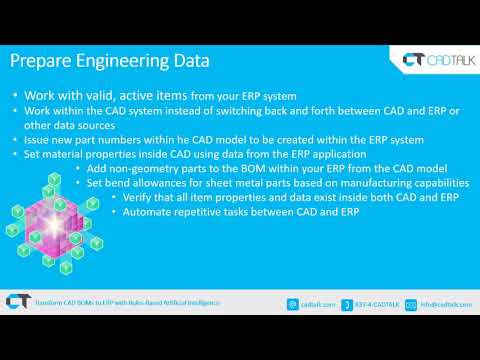 CAD/PLM to ERP BOM Transformation Webinar |
How they explain CAD-to-ERP handoff, BOM transformation, routing/item creation, and ROI. |
| CADDi Drawer |  CADDi Drawer engineer demo |
Drawing search, similar-shape search, digitized drawing data, and the search-first UI pattern. |
| CoLab AutoReview | 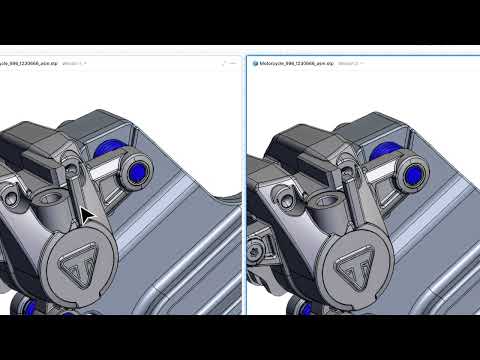 Engineering AI that checks models and drawings |
How AI findings are turned into drawing/model markup, comments, and design-review workflow. |
| CoLab AI Drawing Review | 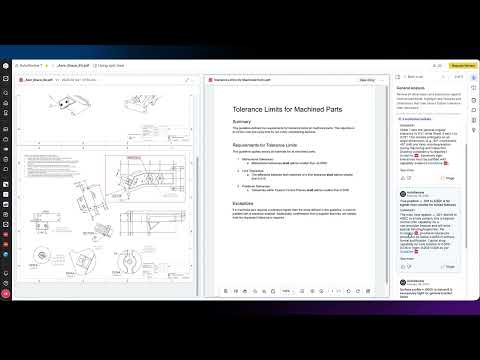 AI Drawing Review: Automating 2D Engineering Checks |
Drawing-specific check presentation, GD&T review framing, and checklist-style output. |
| Werk24 | Werk24 product page |
How drawing extraction is positioned as structured data for ERP, PLM, MES, quoting, and automation. |
| OpenBOM |  Graph queries in OpenBOM |
Product graph language, BOM/part relationships, and how PLM data is made queryable. |
| Duro Design |  Why Duro rebuilt its PLM as Duro Design |
AI-native PLM messaging, object model, configuration language, and workflow breadth. |
| Siemens Teamcenter Copilot |  Introducing Teamcenter Copilot |
PLM-native chat/search, document grounding, permissions, and how incumbents frame AI assistance. |
| Leo AI |  Welcome to Leo |
CAD-native AI assistant UX, prompt-to-engineering workflow, parts search, and mechanical design language. |
| QualityEngineer.ai Blueprint Intelligence |  Blueprint Intelligence |
Drawing-to-quality workflow: feature extraction, GD&T, SC/CC characteristics, APQP, FAI, and inspection planning. |
| Markovate AI Blueprint Classifier | 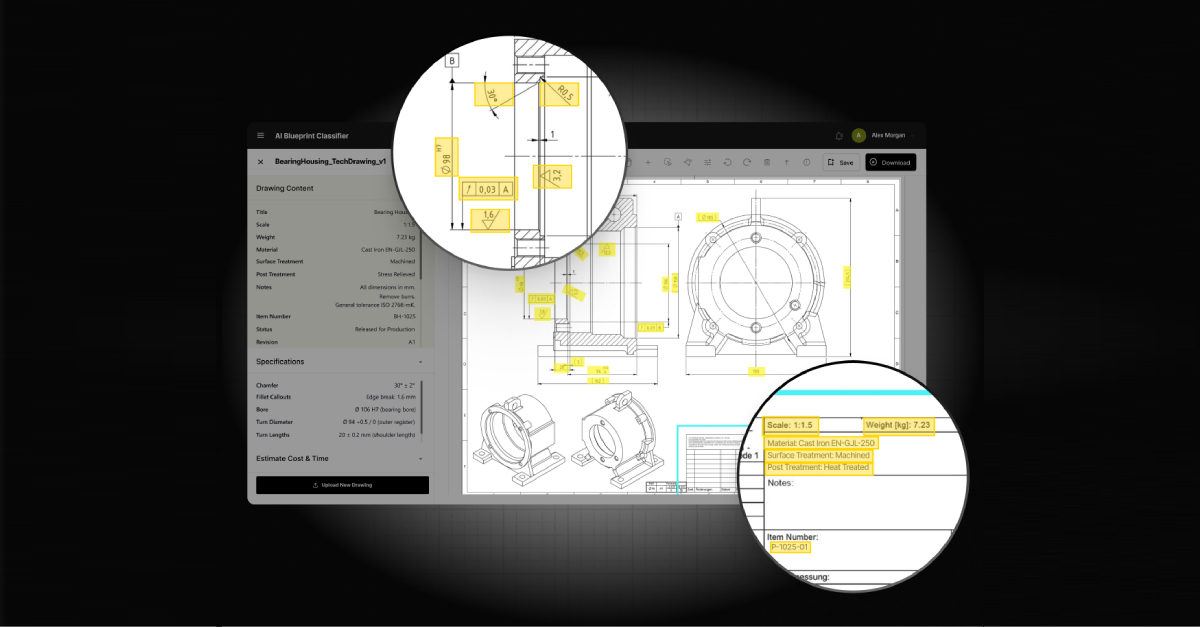 AI Blueprint Classifier |
CAD-to-BOM and blueprint annotation messaging, especially how they frame estimator and pre-production value. |
| VizSeek |  VizSeek visual search |
Search-by-image, shape, sketch, drawing, and text across CAD, drawings, PLM, ERP, PDM, and SharePoint. |
| CCTech AI Part Search | AI-based Part Search |
Part reuse, duplicate elimination, and multi-system part intelligence across CAD, PLM, ERP, and documents. |
Viewing Notes
- Use the videos to study workflow sequence, not only visual style.
- Watch for how each product makes extracted data actionable: markup, issue list, search result, BOM diff, approval flow, export, or writeback.
- Notice where the UI stops: many tools extract or search, but fewer complete the release decision and downstream handoff.
Stack Names To Track In Discovery
These are the stack names that appear across the reports and should be listened for in customer conversations.
| Layer | Names mentioned | Why it matters |
|---|---|---|
| CAD authoring | SolidWorks, Siemens NX, Creo, Inventor, Fusion 360, Onshape, CATIA, Solid Edge | These define where release packages originate and which first integration or upload path may be credible. |
| PDM / PLM / product data | SolidWorks PDM, Vault, Teamcenter, Windchill, Arena, Aras, OpenBOM, Duro, Propel | These define revision control, approval state, part records, and where incumbents may already offer AI features. |
| ERP / business systems | SAP, Oracle, Microsoft Dynamics, Business Central, Infor, Epicor, NetSuite, QuickBooks, Acumatica, IFS, SYSPRO, QAD, Sage, proALPHA, abas, Applus, SAP Business One, SAP S/4 | The reports repeatedly tie willingness to pay to ERP cleanup, item creation, routing, cost, and purchasing handoff. |
| Data and office handoff | Excel, CSV, JSON, PDF, DXF, STEP, Word, PowerPoint, SharePoint | These are the practical bridge formats and current workarounds. MVP exports can use them before deep writeback. |
| Cloud / deployment references | AWS, Azure, Meta Llama, on-prem deployments | Enterprise customers may care about deployment, access control, and security before they trust AI over release data. |
CAE And Simulation References
The CAE reports are adjacent to the Release Readiness pivot. They should stay on the watchlist unless customer discovery pulls simulation-readiness into the same buyer journey.
| Tool / software | Report context | What the reports say |
|---|---|---|
| Ansys / Fluent / CFD-Post / Workbench | CFD, CAD prep, post-processing, automation | Reports mention geometry preparation, meshing, solver setup, CFD-Post export, Workbench automation limits, and repeated need for Python/scripts. |
| Abaqus / Abaqus CAE / SIMULIA | Nonlinear FEA and convergence triage | Reports mention convergence debugging, contact issues, scripting, and the need for ranked root-cause guidance. |
| Nastran / pyNastran | Result extraction and reporting | Reports mention Nastran OP2 processing and pyNastran-style scripting for envelopes and critical result extraction. |
| OpenFOAM / SU2 / Gmsh / pygmsh / gmshModel / snappyHexMesh | Open-source CFD and meshing | Reports cite fragmented open-source workflows, hard-to-automate meshing, manual IDs, and need for better workflow shells. |
| ParaView | Post-processing | Reports mention ParaView automation and saving post-processing state or Python code for repeatable reporting. |
| FreeCAD / Salome / PrePoMax / CalculiX | Open-source CAE workflow stack | Reports describe teams stitching together open-source pre/post workflows because usability and interoperability remain weak. |
| HyperMesh | Geometry cleanup and meshing | Reports cite HyperMesh as a tool used for dirty geometry, contrasting it with weaker cleanup in some solver environments. |
| LS-DYNA | Explicit dynamics / simulation context | Appears in CAE research as part of the high-end solver ecosystem and public workflow discussion. |
| BETA CAE Systems / SPDRM | Simulation data and process management | Reports treat SPDRM as evidence that CAE workflow, data management, and HPC/process management already have budget. |
| SimScale | CAD-prep reference | Reports cite SimScale guidance to show that geometry preparation is foundational and still iterative. |
| NAFEMS | Simulation process reference | Used as an industry signal around simulation data management, credibility, and workflow maturity. |
What To Study First
| Study first | Reason |
|---|---|
| CADTALK | Best reference for CAD-to-ERP buyer pain, ROI framing, and writeback expectations. |
| CADDi Drawer | Best reference for drawing-centric manufacturing intelligence and similar-drawing search. |
| Werk24 and QualityEngineer.ai | Best references for structured drawing extraction and what extraction-only products leave unsolved. |
| CoLab AutoReview | Best reference for AI review workflow, customer trust, and enterprise design-review packaging. |
| Siemens Teamcenter Copilot | Best reference for why generic PLM/document RAG will be hard to defend. |
| OpenBOM and Duro | Best references for modern BOM/PLM packaging and integration expectations. |
Product Boundary
For Pivot Research, the tool map supports this boundary:
- Build around release package readiness, issue evidence, BOM/drawing consistency, and handoff summaries.
- Integrate with CAD/PDM/PLM/ERP over time, but do not start by replacing them.
- Use drawing extraction and RAG as evidence layers, not as the product category.
- Keep CAE tools as adjacent references unless the same release package workflow includes simulation evidence.
Open Questions
- Which reference tool resonates most with target customers: CADTALK, CADDi, CoLab, Werk24, or OpenBOM?
- Which stack pairing should be tested first: SolidWorks PDM plus ERP export, Teamcenter/NX plus neutral package upload, or PDF/BOM-only package review?
- Should the first demo explicitly compare RapidDraft against CADTALK-style ERP handoff, or would that make the scope look too integration-heavy?
- Are CADDi-style similar drawing search and PTC-style part rationalization later modules, or do they belong in the first Release Readiness demo?
Sources
docs_pivot/_sources/AI-Enabled CAD, BOM, and Engineering Knowledge Startups Market Map and Strategic Options for RapidDraft.docxdocs_pivot/_sources/RapidDraft Pivot Deep Research cad erp.docxdocs_pivot/_sources/Pivot deep research.mddocs_pivot/_sources/Chatgpt_Startup Opportunity Research_ Unmet Problems in Mechanical Design, CAD, Manufacturing, Assembly, and.docxdocs_pivot/_sources/Chatgpt_Startup Opportunity Research_ Unmet Problems in FEM_CFD Simulation Engineering.docxdocs_pivot/_sources/chatgpt_Startup Opportunity Research_ Unsolved Problems in FEM, CFD, and CAE Workflows.docx