Vision Model Quality Evaluation
Last updated: 2026-05-31
Decision
local/qwen-vision-fast now points to Qwen3-VL-8B-Instruct-Q4_K_M on the Fedora local AI server.
The previous Qwen3.5-9B-Q4_K_M model remains on disk as the rollback option, but it should not be the default RapidDraft Agent vision route because it repeatedly leaked reasoning preambles such as "The user wants..." into user-visible output.
Why This Was Tested
RapidDraft Agent can capture CAD/model surfaces and send screenshots to the local vision model, but early output was too weak for a polished BOM demo. The goal of this phase was not to make vision authoritative. It was to decide which local model is good enough for advisory visual notes, screenshots, and BOM enrichment checks.
Authoritative BOM data should still come from the CAD/STEP/model backend. Vision should add visible-geometry notes, uncertainty, and mismatch hints.
flowchart LR
  A["RapidDraft model / STEP backend"] --> B["Deterministic BOM rows"]
  B --> C["Initial BOM artifact"]
  D["Agent screenshot or component crop"] --> E["local/qwen-vision-fast"]
  E --> F["Visual note + uncertainty"]
  F --> G["BOM enrichment"]
  C --> G
  G --> H["Report / canvas artifact"]
Benchmark Harness
The repeatable benchmark script lives in the local AI stack repo:
/Users/adeelyj/code/local ai server setup/local-ai-stack-repo/scripts/benchmark_vision_quality.py
It runs on Fedora and writes timestamped results under:
/srv/localai/rocm-test/benchmarks/phase5-vision-quality/
The final prompt-contract run was:
/srv/localai/rocm-test/benchmarks/phase5-vision-quality/20260531T181010Z/
Models Compared
| Role | Model | Projector | Runtime |
|---|---|---|---|
| Previous production | /srv/localai/models/qwen3.5-9b-vlm-q4_k_m/Qwen3.5-9B-Q4_K_M.gguf |
/srv/localai/models/qwen3.5-9b-vlm-q4_k_m/mmproj-F16.gguf |
llama.cpp Vulkan/RADV |
| Promoted default | /srv/localai/models/qwen3-vl-8b-instruct-q4_k_m/Qwen3VL-8B-Instruct-Q4_K_M.gguf |
/srv/localai/models/qwen3-vl-8b-instruct-q4_k_m/mmproj-Qwen3VL-8B-Instruct-F16.gguf |
llama.cpp Vulkan/RADV |
The promoted model is symlinked from the isolated ROCm/Vulkan benchmark model directory into the production /srv/localai/models/ tree.
Test Inputs
| Case | Image | Purpose |
|---|---|---|
| Real CAD-like part | /tmp/localai-benchmark-inputs/hot_melt_bracket_isometric.png |
Geometry description and uncertainty behavior |
| RapidDraft BOM report | /tmp/localai-benchmark-inputs/theegarten_bom_release_report.png |
Report/table extraction for demo artifacts |
| Synthetic bracket | /srv/localai/rocm-test/benchmarks/20260531T172731Z/cad_bracket_benchmark.png |
Stable sanity-check image |
Prompt Contract
The benchmark uses a strict final-answer contract:
Return final observations only. Do not mention the prompt, the user request,
or your reasoning process. Do not start with phrases like "The user wants"
or "I need to". Use concise engineering language and explicitly mark uncertainty.
This matters because the previous model often produced useful facts wrapped in user-visible chain-of-task language.
RapidDraft Agent CAD Screenshot Benchmark
On 2026-05-31, the Agent vision route was benchmarked against a cropped RapidDraft CAD workspace screenshot using the same image and prompt across two evaluators:
- A reference vision agent produced a target-quality analysis from the crop.
- The Fedora local vision route,
local/qwen-vision-fast, analyzed the same crop through RapidDraft's/api/agent/vision/describe-screenshotendpoint. - The local prompt was then revised and rerun through the same endpoint and image.
Benchmark crop:
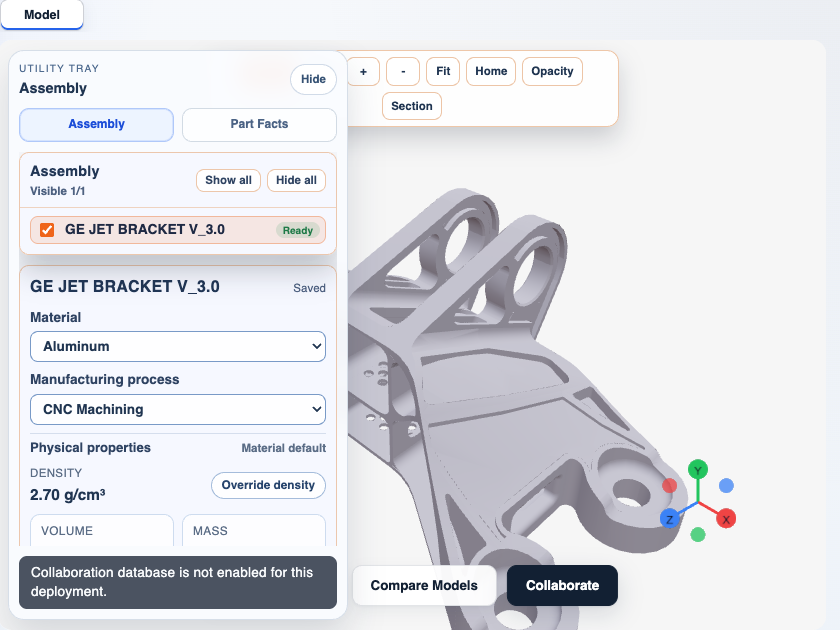
| Item | Value |
|---|---|
| Image | RapidDraft model workspace crop from the GE Jet Bracket demo |
| RapidDraft route | /api/agent/vision/describe-screenshot |
| Local model alias | local/qwen-vision-fast |
| Base URL used by RapidDraft | http://100.95.33.93:4000/v1 |
| Reference method | separate vision agent using the same benchmark prompt |
| Product purpose | improve advisory CAD visual notes for Agent screenshots and BOM enrichment |
Reference Output Shape
The reference analysis was stronger because it:
- recognized the part as a bracket-like CAD component;
- used mechanical terms such as lug/ear, circular through-hole, rib/web, boss-like feature, pocket/cutout, side wall, and fillet/chamfer;
- transcribed UI metadata such as
GE JET BRACKET V_3.0,Aluminum,CNC Machining,2.70 g/cm3,Ready, and the visible warning text; - kept engineering interpretation cautious;
- explicitly flagged hidden faces, crop cutoff, missing scale, missing tolerances, hole-type uncertainty, missing load cases, and missing QA criteria.
Local Prompt v1 Finding
With the first shared benchmark prompt, local/qwen-vision-fast was usable but not close enough to
the reference for a polished RapidDraft Agent experience.
Strengths:
- identified RapidDraft and the visible bracket-like CAD model;
- correctly read material, manufacturing process, density, status, model name, and warning text;
- followed most of the requested output sections.
Weaknesses:
- described the upper lug holes as generic or
U-shaped cutouts; - under-described ribs/webs, side holes, bosses, rounded profiles, and partial/cropped geometry;
- used broad engineering language without enough CAD-specific vocabulary;
- sometimes treated
Readytoo much like manufacturing readiness; - quality flags were initially too checklist-like and sometimes repeated app warnings instead of screenshot-analysis limitations.
Prompt v2 Result
After adding CAD vocabulary, uncertainty rules, and explicit section headings, the local model output moved much closer to the reference.
Observed v2 behavior:
- recognized paired raised lugs/ears with circular openings;
- described ribs/webs, flanges, side walls, circular openings, and hole-like features;
- kept UI metadata in
UI/Data; - treated
Readyas app/model loaded state, not manufacturing release state; - produced the expected sections:
Visible,Geometry,UI/Data,Engineering Inference,Uncertainty, andQuality Flags; - kept dimensions, tolerances, hole types, hidden faces, and manufacturing intent uncertain.
Example local v2 output summary:
Visible:
- Main visible object: RapidDraft CAD model viewport displaying a bracket assembly.
- Surface type: CAD viewport showing a 3D model within the RapidDraft interface.

Geometry:
- Visible object: "GE JET BRACKET V_3.0" with a complex, angular body structure.
- Features: Two prominent raised lugs/ears with circular openings; multiple side walls and flanges;
  a large circular opening near the base; visible ribs/webs connecting structural elements; a small
  circular hole-like feature near the bottom.

UI/Data:
- Component name: "GE JET BRACKET V_3.0".
- Material: "Aluminum".
- Manufacturing process: "CNC Machining".
- Density: "2.70 g/cm3".
- Status: "Ready".

Engineering Inference:
- The model is a bracket with structural features suitable for mounting or support.
- The "Ready" status indicates the model is loaded and viewable in the app.
Prompt v2 Scorecard
| Category | Reference Agent | Local prompt v1 | Local prompt v2 | Notes |
|---|---|---|---|---|
| Overall usefulness for Agent visual notes | 9/10 | 6.5/10 | 8/10 | v2 is good enough for advisory notes. |
| Visible scene grounding | 9/10 | 8/10 | 8.5/10 | v2 keeps the CAD viewport and UI context. |
| CAD geometry vocabulary | 9/10 | 5/10 | 7.5/10 | v2 recovers lugs/ears, ribs/webs, flanges, and circular openings. |
| UI text extraction | 9/10 | 8/10 | 8.5/10 | Strong across both local runs. |
| Hallucination restraint | 9/10 | 7/10 | 8/10 | v2 avoids manufacturing-ready claims. |
| Engineering inference discipline | 9/10 | 6/10 | 7.5/10 | Still advisory; not enough for release decisions. |
| Quality flag usefulness | 9/10 | 7/10 | 8/10 | v2 better separates screenshot limits from UI warnings. |
Canonical RapidDraft Vision Analysis Prompt v2
This is now the prompt contract to use for RapidDraft Agent vision analysis. RapidDraft should call
local/qwen-vision-fast through LiteLLM and use this prompt shape for CAD/product screenshots.
Implementation points in the RapidDraft repo:
server/agent/vision.py
server/agent/orchestrator.py
Canonical prompt:
Return final observations only. Do not mention the prompt, the user request, or your reasoning process.
Do not start with phrases like 'The user wants' or 'I need to'.
You are inspecting a RapidDraft CAD/product screenshot. Answer only from visible pixels.
Use cautious mechanical CAD vocabulary and separate direct observation from inference.
Surface: <surface title> (<surface type>).
Prefer precise terms when visible: lug/ear, circular opening, through-hole, hole-like feature, boss, rib/web, pocket, slot, flange, plate/body, fillet, chamfer, cutout, side wall.
Distinguish circular openings inside raised lugs/ears from open U-shaped slots or generic cutouts.
Rules:
- Do not invent dimensions, tolerances, alloy/temper, hidden faces, DFM findings, load paths, or pass/fail judgments.
- Do not say a feature is absent unless the visible view clearly proves absence; prefer 'not confirmed from this view' for uncertain geometry.
- Treat UI fields as visible metadata only. Transcribe readable UI values exactly when readable.
- The UI status 'Ready' means the app/model appears ready or loaded; it does not mean the part is ready for manufacturing.
- Mention repeated or paired features when visible, such as paired lugs, multiple small holes, or repeated ribs.
- If the model is cut by an image edge, viewport edge, sidebar, toolbar, floating control, or button, flag crop/cutoff or occlusion.
Return these exact sections with concise bullets:

Visible:
- Main visible object or active RapidDraft panel.
- Whether it is a CAD viewport, drawing, report, or other surface.

Geometry:
- Visible CAD geometry/features only.
- Include visible lugs/ears, circular openings, ribs/webs, bosses, pockets, slots, flanges, side walls, plates/bodies, fillets/chamfers, symmetry cues, and orientation.
- Mark uncertain features as 'appears to be' or 'not confirmed from this view'.

UI/Data:
- Readable model/component names, material, process, density, volume/mass values, status badges, warnings, and toolbar labels.
- Mark cropped or unclear text as 'not readable'.

Engineering Inference:
- Cautious observations supported by visible geometry or UI text only.
- Label inference clearly and avoid exact measurements, readiness-for-manufacturing claims, or QA pass/fail conclusions.

Uncertainty:
- What cannot be verified: hidden faces, scale/units, dimensions, tolerances, hole types, alloy/temper, manufacturing intent beyond visible fields, load cases, assembly relationships, and hidden components.

Quality Flags:
- Write 2-4 bullets about actual screenshot/analysis limitations.
- Do not repeat UI/Data entries here; app warnings and status badges are not screenshot limitations.
- Do not use a category checklist. Do not write 'none' or standalone 'not confirmed' as a quality flag.
Product Interpretation
Prompt v2 improves the local model, but it does not change the architecture rule:
- deterministic RapidDraft/STEP/model data remains the source of truth;
- local vision is an advisory observer;
- vision notes can enrich BOM rows, screenshots, reports, and mismatch checks;
- vision output must not create BOM rows, quantities, dimensions, tolerances, DFM findings, or pass/fail decisions on its own.
Final Benchmark Result
Settings:
| Setting | Value |
|---|---|
| Context | 8192 |
| Image max tokens | 768 |
| Output tokens | 320 |
| Temperature | 0.1 |
| Template | --jinja |
| Runtime | Vulkan/RADV llama.cpp |
| Image case | Previous Qwen3.5 9B | Qwen3-VL 8B candidate | Decision |
|---|---|---|---|
| Real CAD-like part | 7.0 / 10, 12.9s, leaked reasoning preamble |
7.4 / 10, 8.8s, cleaner final answer |
Qwen3-VL better |
| RapidDraft BOM report | 4.4 / 10, 11.7s, leaked reasoning preamble |
6.2 / 10, 8.0s, structured report extraction |
Qwen3-VL much better |
| Synthetic bracket | 6.6 / 10, 11.4s, leaked reasoning preamble |
6.8 / 10, 3.2s, concise final answer |
Qwen3-VL better |
The score is a lightweight heuristic for triage, not a human-quality score. The important product finding is behavior: Qwen3-VL follows the output contract more reliably and is faster on the tested screenshots.
HTTP Smoke Test After Promotion
After updating localai-qwen-vision.service, the OpenAI-compatible backend route was tested directly:
http://127.0.0.1:8011/v1/chat/completions
model: local/qwen-vision-fast
Observed timing for a RapidDraft BOM report screenshot:
| Metric | Value |
|---|---|
| Prompt tokens | 1961 |
| Completion tokens | 165 |
| Prompt speed | about 479 tok/s |
| Generation speed | about 40 tok/s |
The response cleanly extracted the report title, major sections, BOM table columns, visible item rows, status badge, warnings, and missing information.
The client-facing LiteLLM proxy was also tested:
http://127.0.0.1:4000/v1/chat/completions
model: local/qwen-vision-fast
It returned 200 OK and a final-only CAD geometry description through the same alias RapidDraft should use.
Active Service Shape
localai-qwen-vision.service
  --model /srv/localai/models/qwen3-vl-8b-instruct-q4_k_m/Qwen3VL-8B-Instruct-Q4_K_M.gguf
  --mmproj /srv/localai/models/qwen3-vl-8b-instruct-q4_k_m/mmproj-Qwen3VL-8B-Instruct-F16.gguf
  --alias local/qwen-vision-fast
  --host 127.0.0.1
  --port 8011
  --ctx-size 8192
  --parallel 1
  --gpu-layers auto
  --flash-attn auto
  --jinja
  --metrics
  --no-ui
Clients should keep using local/qwen-vision-fast; the alias hides the model swap.
Product Rule
Use vision for:
- CAD screenshot descriptions
- visible geometry notes
- report/screenshot extraction
- per-component visual enrichment
- uncertainty and mismatch hints
Do not use vision as the source of truth for:
- component membership
- quantities
- exact dimensions
- material assignment
- revision state
- release decisions
Rollback
If Qwen3-VL regresses in RapidDraft browser testing:
- Restore
localai-qwen-vision.serviceto the previous Qwen3.5 model and projector paths. - Run
sudo systemctl daemon-reload. - Restart only
localai-qwen-vision.service. - Keep the alias
local/qwen-vision-fastunchanged so client code does not move.
The old model files are intentionally retained:
/srv/localai/models/qwen3.5-9b-vlm-q4_k_m/Qwen3.5-9B-Q4_K_M.gguf
/srv/localai/models/qwen3.5-9b-vlm-q4_k_m/mmproj-F16.gguf
Open Questions
- Should Prompt v2 be split into separate variants for CAD model views, drawings, reports, and BOM tables, or should RapidDraft keep one conservative visual-analysis prompt for all screenshots?
- Should the Agent store local vision confidence and prompt version on each vision artifact so future benchmark changes can be audited?
- How many pilot screenshots should become the standard regression set before changing
local/qwen-vision-fastagain?
Sources
/Users/adeelyj/code/rapiddraft/45_co2/rapiddraft_utumpitch/server/agent/vision.py/Users/adeelyj/code/rapiddraft/45_co2/rapiddraft_utumpitch/server/agent/orchestrator.py/Users/adeelyj/code/rapiddraft/45_co2/rapiddraft_utumpitch/output/vision_benchmark//Users/adeelyj/code/local ai server setup/local-ai-stack-repo/scripts/benchmark_vision_quality.py/srv/localai/rocm-test/benchmarks/phase5-vision-quality/20260531T181010Z/